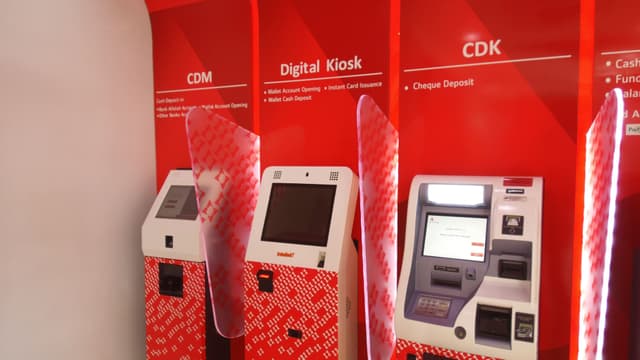
Most OCR vendors only handle printed cheque fields. The Azimut SDK processes both: printed and handwritten cheques — bank checks, in US terms — with over 97% field extraction accuracy. It validates the MICR line, captures UV images for security feature checks, verifies signatures, and posts to your core banking system. One API for cheque data extraction, whether the check arrived at a self-service kiosk or a desktop scanner.
How the cheque ocr & fraud detection flow works
Every step is managed by the SDK. Your application calls SDK methods and receives results — the device interactions happen inside the platform layer.
Image capture — kiosk or desktop scanner
The SDK accepts cheque images from CDM-embedded scanners at self-service kiosks and from desktop document scanners at teller or back-office workstations. Both visible-light and UV images are captured where the hardware supports it — UV capture reveals security features, watermarks, and chemical alterations invisible under standard lighting.
MICR line reading and validation
The SDK reads and validates the MICR line (account number, sort code, cheque serial number) using E-13B or CMC-7 encoding. MICR characters are independently validated against the cheque number printed in the courtesy amount region — mismatches are flagged before OCR extraction continues.
OCR field extraction — printed and handwritten
OCR extracts the payee name, date, written amount, and numeric amount from the cheque body. The SDK achieves over 97% field accuracy on handwritten cheques — not just machine-printed ones. Most OCR vendors only reliably handle printed fields; handwritten amounts and payee names are where accuracy typically collapses. Field confidence scores are returned to the application for downstream decision-making.
Signature verification
The signature region is extracted from the scanned image and compared against the reference signature held in the bank's system. The SDK returns a match confidence score. Low-confidence results are routed to the exception queue rather than auto-rejected.
Fraud detection
The SDK runs configurable fraud checks: amount discrepancy between written and numeric fields, UV security feature validation, duplicate cheque detection, altered or overwritten fields, and watchlist screening. Each check returns a discrete result your application can act on.
Clearing and core banking posting
On a clean result, the SDK posts the validated MICR data and extracted fields to your clearing network or core banking API. On any failure, the cheque is flagged and the session does not advance to clearing.
What the SDK extracts from each cheque
Cheque data extraction returns every field on the cheque — printed and handwritten — as structured data with per-field confidence scores. The same extraction runs on bank check images from a kiosk-embedded scanner or a desktop document scanner.
Payee name
The pay-to name, extracted from printed or handwritten cheques with a confidence score for downstream validation.
Date
Cheque date read and normalised, with stale-dated and post-dated cheques flagged for the application to act on.
Legal amount (written)
The amount written in words — the field where most OCR vendors lose accuracy on handwriting. The SDK reads it at 97%+.
Courtesy amount (numeric)
The numeric amount, cross-checked against the legal amount so written/numeric mismatches surface before clearing.
MICR line
Account number, sort code, and cheque serial read and validated using E-13B or CMC-7 encoding.
Signature & UV security features
The signature region for verification, plus UV-captured watermarks and security marks for tamper and alteration checks.
What the SDK handles
Hardware
- Kiosk-embedded cheque scanner (front/back, visible + UV)
- Desktop document scanner (teller and back-office)
- MICR reader (E-13B and CMC-7)
- Cash acceptor / CDM
- Receipt printer
Integrations
- Core banking APIs
- Cheque clearing networks (MICR E-13B / CMC-7)
- Signature verification backends
- Fraud detection and watchlist services
- UV security feature validation
- 1LINK and RAAST (Pakistan)
Deployed with
Production deployments running cheque ocr & fraud detection flows in real environments.

Bank Alfalah
Cash and cheque deposits at Digital Branch kiosks. OCR extraction and clearing integrated through the SDK.

Bank Al Habib
Live production cheque deposits via CDMs, with active operational support for clearing and exception handling.

Diamond Trust Bank
Cheque deposit flows at self-service kiosks. SDK handles scanning, data extraction, and core banking posting.
Banque Atlantique
Cash and cheque deposits via CDMs across the West African network.